One Dashboard. Complete HSE Visibility.
OSHA & ILO-OSH 2001 Aligned HSE Management Dashboard
One form for every Incident. The system decides where it goes.
“Aligned” indicates that selected HSE practices and reporting categories are mapped to applicable OSHA requirements and to the ILO-OSH 2001 guidelines; it does not constitute certification, approval, or endorsement by any of these bodies.
A nurse reports a needlestick. A porter reports a spill. A doctor reports a medication error. They all use the same form. Our triage engine classifies the risk, routes it to the right department, and tracks it until Quality confirms the fix actually worked.
Most hospitals collect incidents well and close them badly. Reports arrive on paper, on email, and in three separate registers. Someone re-types them. Someone else decides who should investigate. Corrective actions get marked complete without anyone checking whether they made a difference. Six months later, a surveyor asks what changed after the last serious fall, and the honest answer is that nobody knows.
This system was built to close that gap. One Occurrence Variance Report captures every kind of event across the hospital. From the moment it is submitted, the workflow runs itself.
The Problem
Your reporters shouldn't need to know your org chart
Ask a nurse to choose between an incident form, an occupational health form, an infection-control notification, and a patient safety report, and one of two things happens. She picks the wrong one, or she doesn’t report at all.
Under-reporting is rarely a culture problem first. It’s a friction problem. Every extra decision you put in front of a reporter costs you visibility into your own hospital.
Four forms, one event
Incident form. Occupational health form. Infection-control notification. Patient safety report. The reporter has to pick before they can describe what happened.
Three separate registers
Reports arrive on paper, on email, and in registers that never reconcile. Someone re-types them. Someone else decides who investigates.
Closure without verification
Corrective actions get marked complete without anyone checking whether they made a difference.
So we removed the decisions. Staff describe what happened. The system handles the rest.
One System, Every Module
Incident reporting is where it starts. It isn't where it stops.
Every element of the safety management system in one place, recorded, assigned, and closed out with an owner and a date.
Incidents
One OVR form for every event type, triaged and routed automatically.
Inspections
Scheduled rounds with observations logged against each area.
Meetings
Safety committee minutes with action items that carry forward.
Trainings
Scheduled versus completed, with attendance and compliance rates.
Drills
Planned, executed, and overdue drills tracked against target dates.
Action Items
Every CAPA with an owner, a due date, and a live status.
Reports
Audit-ready output built from the record, not reassembled from it.
OSH Policy
Current policy documents held alongside the events they govern.
QR Codes
Scan-to-report access points placed where incidents actually happen.
Resources
Reference material available to staff at the point of reporting.
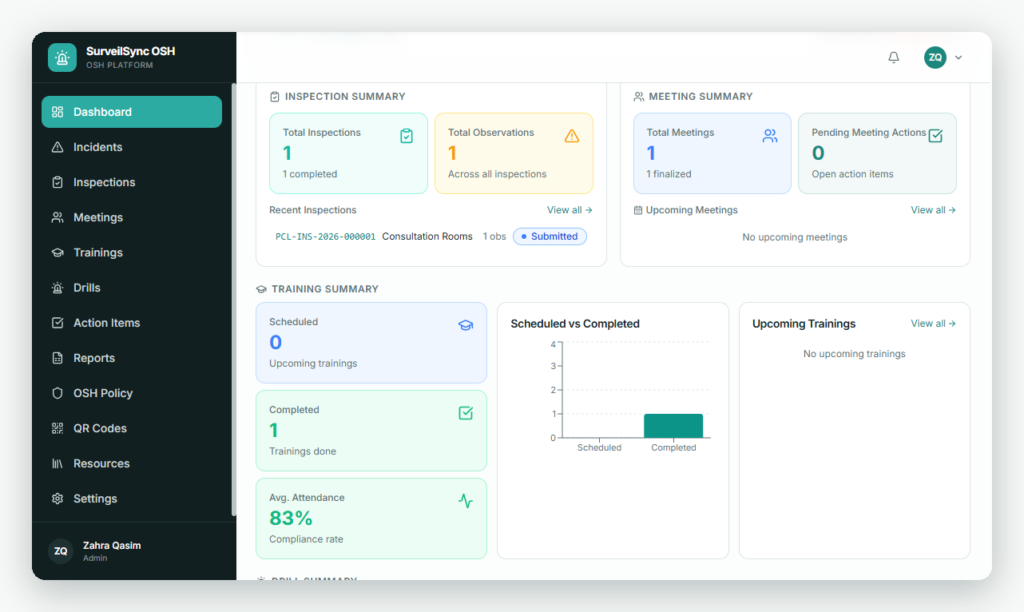
Inspections, meetings and training tracked in the same view
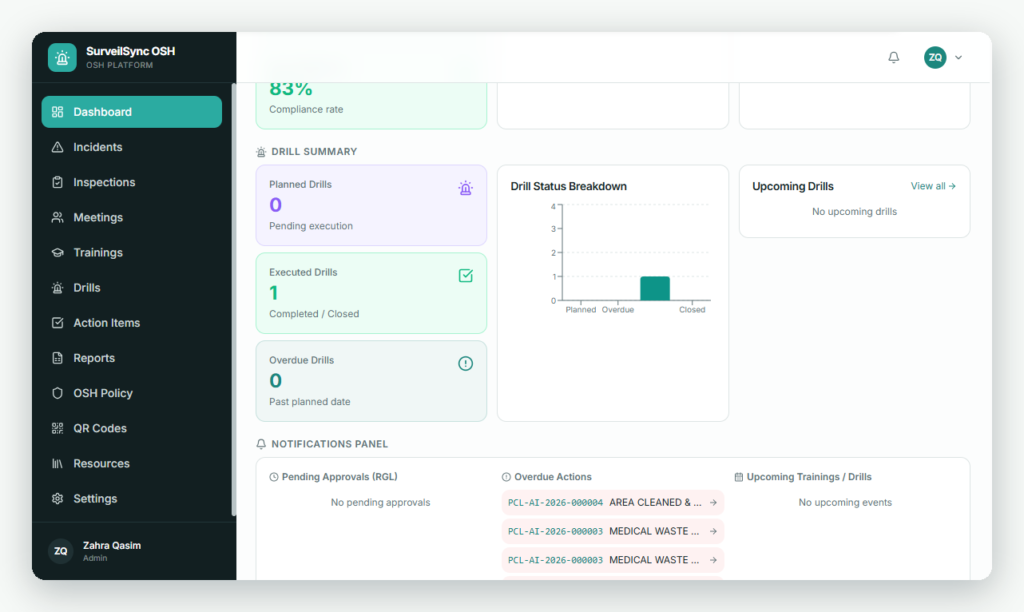
Drill status and live notifications for approvals and overdue actions
How It Works
Four things happen automatically the moment a report is submitted
No triage inbox. No coordinator forwarding reports. The rules are yours to configure, and they run in seconds.
01
The risk gets classified for you
Reporters don’t need to understand risk terminology. They answer two plain questions: what actually happened, and what could have happened. Actual outcome runs from near miss through no harm, mild, moderate, and severe harm, to death. Potential outcome runs from low to extreme.
The built-in matrix multiplies likelihood by severity and assigns a risk level — low, moderate, high, or extreme — without the reporter guessing at a category they were never trained on.
02
The event routes itself to the right team
This is where the system stops being a form and starts being a workflow.
- Needlestick → Occupational Health + Infection Prevention
- Medication error → Pharmacy + Quality
- Equipment failure → Biomedical Engineering
- Patient fall → Quality + Nursing
- Fire → HSE + Facilities + Security
- Sentinel / high-risk → Executive Leadership, immediately
No triage inbox. No coordinator manually forwarding reports. The routing rules are yours to configure, and they run in seconds.
03
Investigation follows a defined path
The responsible department receives the case with everything already attached: reference number, incident type, location, affected person, description, immediate actions, and risk classification. The investigator records what happened, why it happened, and which contributing factors were involved — human factors, communication, staffing and workload, training and competency, equipment, environment, policy, documentation, or process failure.
The system then decides whether a full root cause analysis is warranted. Deaths, severe harm, sentinel events, high and extreme risk, repeat serious events, and significant system failures trigger RCA automatically. Everything else takes the departmental investigation and CAPA route.
Your RCA capacity goes to the cases that need it.
04
Nothing closes until it's verified
Every corrective and preventive action gets a responsible department, a named owner, a due date, and a priority. Status is visible at all times: open, in progress, completed, or overdue.
Then comes the step most systems skip. When a department marks an action complete, Quality reviews whether it actually worked. If the answer is no, the case returns to the department. If the answer is yes, Quality closes it with a closure date, a closing signature, and a final classification.
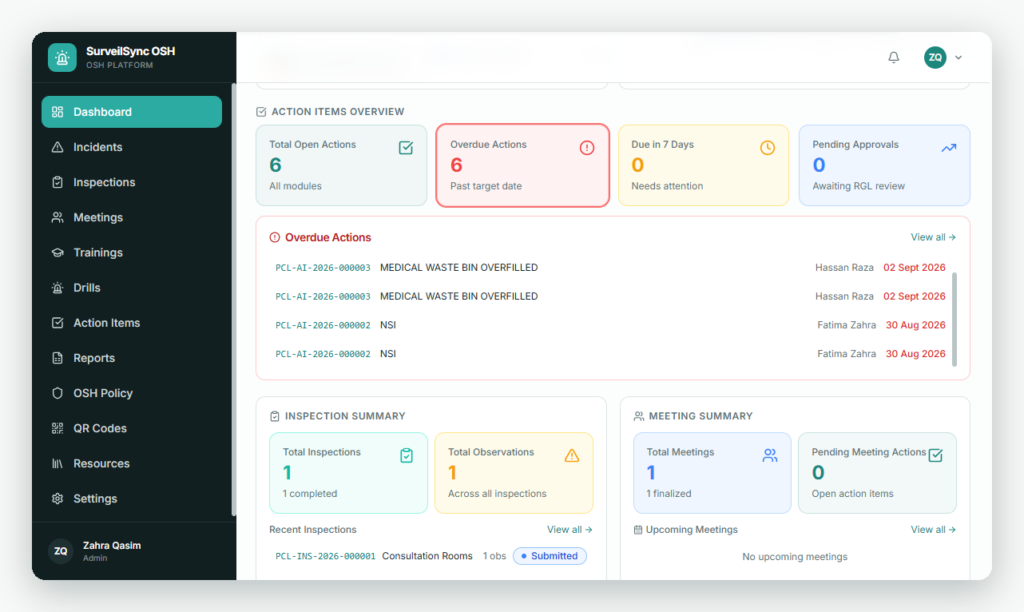
Open, overdue, due-in-7-days and pending approvals — with every overdue action showing its reference number, owner and due date.
“Action completed” and “event closed” are not the same thing. Only one of them means the hazard is gone.
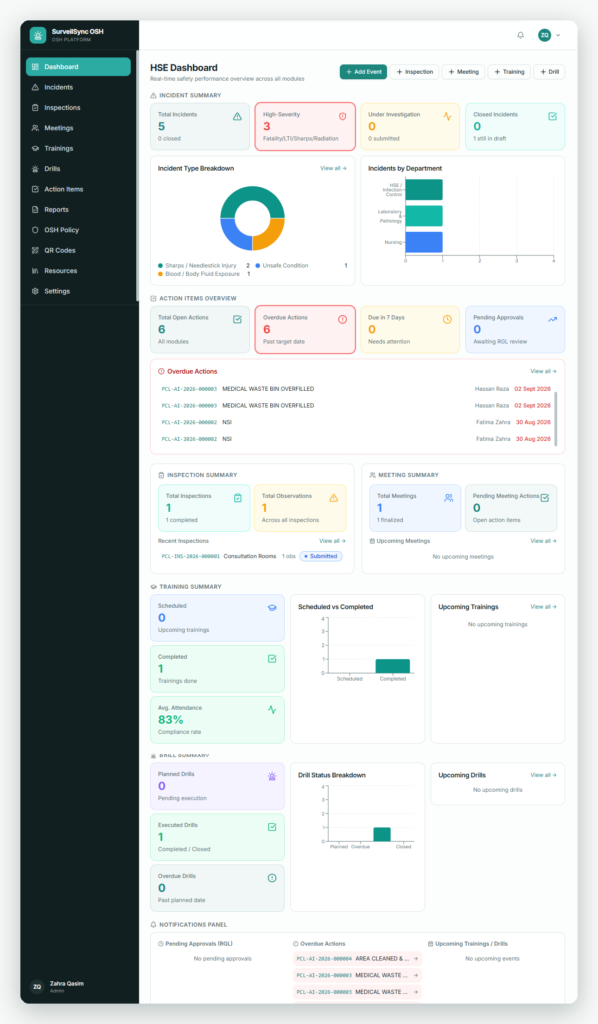
The Dashboard
Answer the committee's questions before they are asked
Total reports, open, overdue, closed, high risk, sentinel, and near miss — live, at the top of the screen.
BREAKDOWNS
- Events by department
- Events by incident type
- Patient, employee, or visitor affected
- Harm severity distribution
- Risk level distribution
Trends & Accountability
- Month-to-month trend lines
- Repeat incidents flagged
- RCA cases in progress
- Overdue CAPAs by owner
- CAPA effectiveness rates & top ten incident categories
FAQs
Common Questions
Find clear answers about reporting, routing, configuration, implementation, and compliance—so you can see how the system fits your hospital’s existing workflows.
It replaces the register, the routing spreadsheet, and the CAPA tracker. Historical records can be imported.
Yes. Incident categories, department mappings, escalation thresholds, and RCA triggers are all configurable to your structure. Sites, areas, departments, incident types, drill types, meeting types, venues, roles, and staff assignments are all editable by an administrator.
Reporting takes under a minute from a phone. Reporter identity is captured from login, department is pre-filled, and the risk questions are written in plain language. QR codes can be placed in wards and service areas so staff scan and report at the point the incident happens.
Every event carries a permanent reference number, a dated audit trail, and a documented closure decision. The system is OSHA-aligned and designed to support the ISO 45001:2018 requirements relating to event reporting — investigation, risk assessment, root cause analysis, corrective action, verification, and management review. ISO 45001 certification applies to your organisation’s management system rather than to software, so the system supports your certification work; it doesn’t replace it.
Three days. That covers configuration of your sites, departments, incident types and routing rules, plus admin and reporter training. You can begin reporting on day four.
Book a Walkthrough
Bring us a real case From last month
We’ll run it through the full workflow with you — report, triage, routing, investigation, CAPA, verification, closure — in thirty minutes. If the flow doesn’t match how your hospital works, you’ll know before you commit to anything.
Smarter Surveillance.
Safer Patients.